

Track people, vehicles, and assets in real time inside Milestone XProtect. Live video sits beside live location. Respond faster. See what happened and where. Click&View live camera feeds.
Table of Contents
Key Takeaways
What does Traxmate do inside XProtect?
It pairs each camera view with live map tracking. Operators see what happened and where. You track people, vehicles, and assets in real time without leaving XProtect. Click&View live camera feeds.
What results can security teams expect?
Faster response by locating and tracking incidents instantly. Better evidence by combining video with movement history. A seamless workflow because you stay in the XProtect dashboard. Scales from small sites to large enterprises.
What accuracy and data do operators see?
Indoor and outdoor positions with room and floor. You can review history and playback trails to understand paths taken.
What alerts and automation are available?
Panic, man-down, inactivity, and geofence entry or exit. You define zones like safe, restricted, or no-video. Alerts trigger actions in XProtect.
What analytics support investigations and operations?
Heatmaps and trail playback reveal patterns and congestion. You export audit-ready reports that include video, trails, and alerts for compliance and case reviews.
How does it connect to XProtect in practice?
Devices send signals to Traxmate. Traxmate calculates positions with room and floor accuracy and pushes them into the XProtect plugin. Operators use Smart Client to view live video next to moving map icons.
What numbers describe XProtect itself?
XProtect supports over 14,000 device types and is deployed in more than 500,000 installations worldwide. It offers centralized control, flexible clients, and strong security features.
What are typical use cases?
- Hospital staff protection with faster dispatch to precise locations.
- Mall patrol coordination with nearest-unit dispatch and SLA-grade response time proof.
- Distribution center tracking that finds delays and optimizes flows using heatmaps.
How do you get started?
Book a demo or sign up on the linked the page. Deploy in cloud or on-prem. Connect your devices, set zones and alerts, and begin viewing live video with live location in one console.
From Blind Spots to Full Control with Traxmate for Milestone XProtect
Traditional video surveillance shows you what’s in front of the camera. But incidents rarely stay in one place.
With Traxmate’s Milestone XProtect integration, every camera feed pairs with live map tracking for seamless integration. Security teams see what happened, where it happened, and where it’s going.
Benefits
Faster response: Locate and track incidents instantly
Interactive Click&View maps: Click a camera and see the live video feed
Better evidence: Combine video and movement history
Seamless workflow: Stay inside your XProtect dashboard
Scalable security: Works for small sites and large enterprises
Enhance operations with Unified video and tracking
- Unified video and location view:
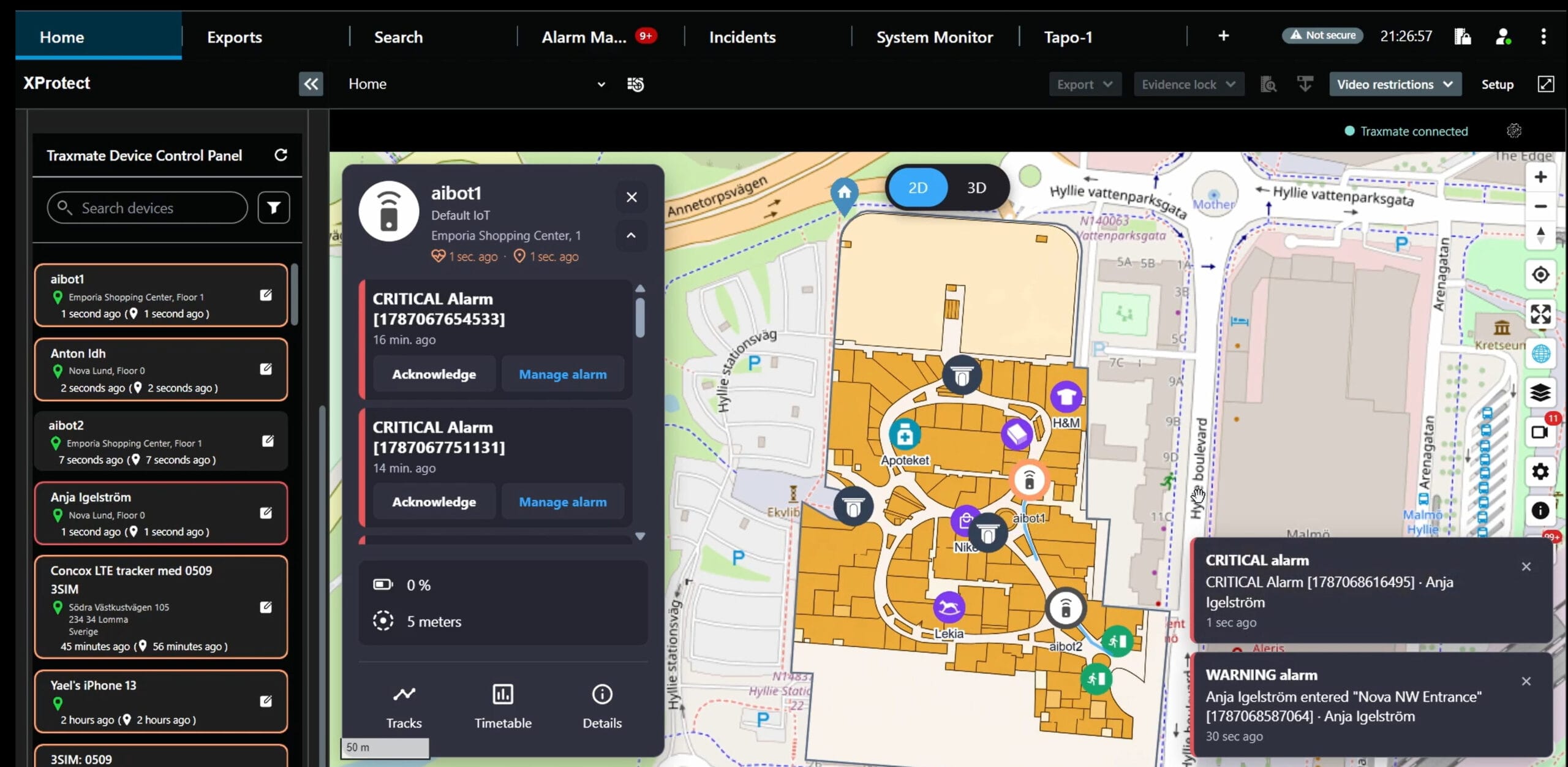
Video and dynamic map overlays appear side by side inside the XProtect console. Click&View live camera streams. - Mapping AI Agent:
Generating live 3D models from 2D floor plans. - Precise real-time tracking:
Positions shown with room and floor accuracy, indoors and outdoors. - Location history and trail playback:
Review past movements and visualize paths taken. - Automated alerts:
Triggers for panic, man-down, inactivity, and geofence entry/exit. - Smart geofencing:
Define safe zones, restricted areas, or no-video zones. Automate alerts when tags cross boundaries. - Analytics and heatmaps:
Discover patterns, optimize staffing, and routes. - Audit-ready video + location reports:
Compile trails, video, and alerts for compliance and investigations.
About Milestone XProtect
Milestone XProtect is an open-platform video management software (VMS). It supports over 14,000 device types and is trusted in more than 500,000 installations worldwide. It serves businesses from small stores to critical infrastructure.
XProtect offers these benefits:
- Scalable deployments:
Expandable from a few cameras to multisite operations. You can deploy on-premises, in the cloud, or in a hybrid environment. - Centralized control:
Integrates cameras, sensors, and analytics in one console. - Flexible client apps:
- Smart Client:
Desktop client for live view, playback, device control, and searches. - Web Client:
Browser-based access for live and recorded video anywhere.
- Smart Client:
- Robust security:
Supports encryption of recorded and streamed media, digital signatures for integrity, role-based permissions, and export controls.

How It Works
Basic functionality, available now
- Devices (tags, trackers, Axis body worn cameras, etc.) send indoor/outdoor signals to Traxmate. Traxmate calculates positions with room- and floor-level accuracy.
- Display real-time and historical tracks, geofencing, door statuses, and more in 3D LiveMaps.
- Traxmate pushes location data into the Milestone XProtect integration. Operators see live video alongside moving map icons. Click on a camera icon and pop up its live video feed – Click&View. Use Smart Client to access the combined view.
Extended functionality, coming soon
- Rules trigger alerts for panic, inactivity, and geofence violations. Traxmate sends notifications via XProtect workflows.
- All data—video, locations, alerts—remain searchable. Operators replay trails, inspect heatmaps, and export evidence with video and geo-data.
Key capabilities—explained with examples
Seamless integration
Tracking directly into an interface operators already know—no steep learning curve. Click&View camera feeds.
Example: Security in a hospital uses Smart Client to monitor both video and badge locations without switching apps.
Real-time positioning
View the location in the building, floor, and room, pinpointed on the floor plan.
Example: In an office complex, you track a guard indoors and outdoors. If he stops somewhere, the map shows the location; replay reveals the trail.
AI-generated 3D floor plans
True Situational Awareness by showing everything in 2D and 3D maps. Rooms, walls, doors windows, and more. Display static or moving objects updated in real-time.
Geofencing control
Define areas and receive alerts for entry and exit.
Example: In a data center, a restricted zone triggers alerts if maintenance staff stray into sensitive areas.
Smart alerts
Automate alerts for emergencies or inactivity.
Example: A lone worker falls in a storage area. The system triggers a man-down alert instantly to supervisors.
Secure evidence capture
Combine video and geo-trail for audits and compliance monitoring.
Example: After an incident, investigators export both video and movement path to reconstruct what happened and when.
Common Use Cases
Every industry faces different challenges, but the need for faster response and better visibility is universal. By combining Traxmate with Milestone XProtect, you move beyond video-only monitoring. Operators see live video and precise location together in one console, which transforms how they manage incidents, protect staff, and optimize operations.
Below are real-world scenarios illustrating how organizations utilize this integration to enhance safety, compliance, and efficiency.
Healthcare and campuses
Protecting hospital staff with Traxmate tracking in Milestone XProtect
A metropolitan hospital employs hundreds of staff across multiple buildings and floors. Security officers rely on Milestone XProtect to monitor hundreds of cameras, but until recently, video alone wasn’t enough.
Late at night, a nurse heads to check on a patient in a restricted ward. She suddenly feels threatened by an aggressive visitor in the hallway. With a single press of a button on her personal safety tracker, Traxmate sends an instant alert.
With the Traxmate for Milestone XProtect integration, operators see more than just video. The nurse’s exact location appears on the map, showing the floor and room she is in. The operator quickly brings up the cameras in that corridor and sees what’s happening in real time.
Security dispatches the closest guard. Because Traxmate shows both patrol trails and current positions, the operator can identify the nearest unit within seconds. The guard is guided directly to the nurse’s location while the situation unfolds on camera.
After the incident, the hospital security team reviews the event. They replay the nurse’s movement, the visitor’s approach, and the guard’s response. Video evidence is matched with location data to create a comprehensive incident record, thereby strengthening accountability and compliance reporting.
Key results
- Faster response times to staff emergencies
- Greater safety for nurses, doctors, and patients
- Stronger compliance with workplace safety requirements
- Clear evidence for reviews and audits
Security operations
Patrol coordination in a shopping mall
A regional shopping mall hosts thousands of visitors daily. Security teams already monitor hundreds of cameras through Milestone XProtect, but verifying patrol coverage remains challenging.
One evening, a shoplifting alert is triggered. An operator sees suspicious behavior on camera but needs to know which guard is closest. With Traxmate, all patrol staff appear as moving icons inside the Milestone XProtect map view. The operator instantly identifies the nearest guard and guides them to intercept the target.
As the incident unfolds, the guard’s live location updates alongside the video feed, giving command a complete overview. After the arrest, the team replays the trail of both the suspect and the responding guard. The timeline confirms response times and verifies that patrols were in the correct zones.
Key results
- Immediate dispatch of the nearest unit
- Verifiable patrol coverage across multiple floors
- Faster and safer incident resolution
- Proof of response times for SLA compliance reporting
Logistics and facilities
Tracking shipments in a distribution center
A distribution center handles thousands of shipments daily. Forklifts, trucks, and staff all move across large indoor and outdoor areas. Cameras capture video in Milestone XProtect, but operators lack context when delays occur.
One morning, a shipment goes missing. The supervisor checks the Traxmate view in Milestone XProtect and pulls up the forklift’s trail for the last load it handled. Traxmate shows that the forklift stopped for 20 minutes in a loading bay, and the video confirms the driver was waiting for clearance.
Heatmaps reveal repeated congestion in that same area. With this insight, management adjusts schedules and reroutes loading to underutilized bays. Delays decrease, and throughput improves.
Key results
- Complete visibility of assets and vehicles indoors and outdoors
- Faster incident investigations
- Data-driven process optimization using heatmaps
Request an account
This integration turns Milestone XProtect from a video-only system into a complete situational awareness tool that protects both people and assets in complex environments.
Sign up for a free 1-month Traxmate evaluation account.
Please note: To best onboard you, we need to have a short meeting.
The signup confirmation mail includes a link to book it directly, or we can contact you to find a suitable time.
Please expect a response by the next business day.